Your board wants more assurance. It also wants the cost of control to go down. For most risk teams, those two asks pull in opposite directions: more assurance usually means more testing, and more testing means more hours and thus more cost.
At our user conference in September, Maurits Toet, COO of CERRIX, put a number on that tension. He walked through a business case for control framework optimisation and automation, built on what we see across our client base. The short version: an average mid-sized client spends over half a million euros a year just running and testing its controls. More than half of that can be saved, while assurance increases.
Here is how the case is built, so you can run the numbers for your own framework.
Why the cost of control keeps rising
Control frameworks continue to grow, mainly driven by increasing regulatory pressure. Every new regulation adds controls, and few get removed. We have clients running more than 2,000 controls in a single company.
Most of those controls are still performed and tested manually. Because controls are executed and tested again and again, that cost adds up fast. Manual control execution also takes time away from your employees' core activities. And because people are only human, the outcomes can be biased.
For testing, one employee usually pulls data from a system or file and puts it into the GRC system. Another employee then compares that data against a test activity plan and records a test score. Finally, the second line reviews the process.
Another factor adding to the bill is the cost of personnel, which goes up every year. The people who execute and test controls cost considerably more than they did a few years ago.
What makes it hard to change is that nobody sees the actual cost of control. Very few organisations know what their controls cost to run and test, so the cost of control never makes it onto the board agenda and nothing really changes.
The hard conclusion is that all that effort and cost buys less assurance than it should. Testing happens after the fact: if a control failed in January and you test Q1 in April, you are three months late with your remediation. You know it went wrong, but you are simply too late, and you have been exposed to the risk for a prolonged period of time.
What you need is greater and faster insight: more assurance at less cost.
What control costs an average client today
An average CERRIX client spends around €528,000 a year running and testing its controls. That client has 100 to 250 users, 30 to 50 processes, 5 to 10 frameworks, 100 to 250 risks and 500 controls, of which 250 are key controls.
The assumptions behind the number are deliberately simple, and you can argue with every one of them:
- Number of key controls versus supporting controls (in this case 250 key and 250 supporting controls)
- Employee cost per hour (in this case €60)
- Percentage of controls executed manually (in this case 80%)
- Average execution frequency (in this case 6 times a year)
- Duration of a control execution (in this case 2 hours)
- Number of design and implementation (D&I) tests a year (in this case one per control)
- Duration of a D&I test (in this case 1 hour)
- Which controls are tested for effectiveness (in this case the key controls)
- Average number of effectiveness tests a year (in this case 4)
- Duration of an effectiveness test (in this case 3 hours across all roles, based on sampling)
- Percentage of tests that fail (in this case 20%)
- Time for remediation and retesting (in this case 1 hour after a failed D&I test, 2 hours after a failed effectiveness test)
Two things stand out. Control execution is the biggest line by far, more than half the total. And a single effectiveness test takes longer than executing the control it tests.
Now imagine you could cut that number in half. Would your board be interested?
Lever 1: optimise your control framework
The first lever is the framework itself: fewer controls, and fewer of them executed and tested manually.
Start with what you have. Many frameworks carry controls that are really process steps or actions. Clearing those out is often the quickest win, and it lowers the base for everything that follows.
Focus on preventive controls. A preventive control stops a risk before it happens, instead of detecting or repairing the damage afterwards. Get the preventive control right and you often need fewer controls behind it.
At a bank, automated screening of new customers against a sanctions list is a good example. It stops the wrong customers from getting in, instead of having to remove them later. It is also easy to set up: the system checks the customer's details against the list and returns a result.
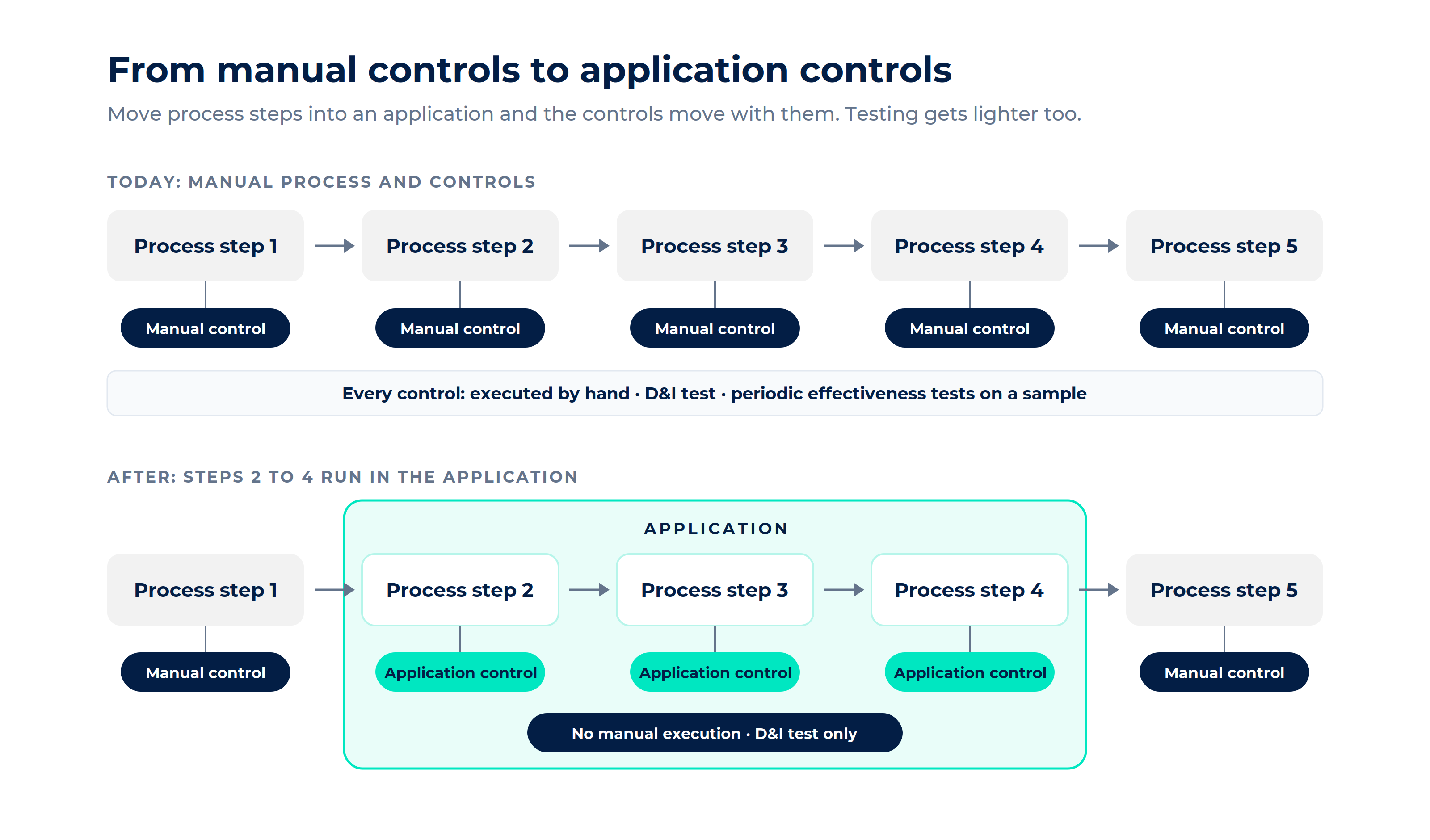
Move from manual controls to application controls. When a process step runs inside an application, the control can run there too. That pays off twice:
- You remove the manual execution, which is the biggest cost line.
- An application control behaves the same way every time. You still test its design and implementation, but you no longer need periodic effectiveness tests on a sample.
Take a four-eyes check in an insurer's claims process. Of the 30 minutes one check takes, around 25 go into collecting documents and matching them against each other. Only the last 5 are the actual review. Automate the collecting and matching, and the reviewer spends their time on the part that needs judgement. At thousands of claims a year, that adds up fast.
This does take an upfront investment. Costs go up briefly before they come down. If your source systems already have APIs, that investment is a lot smaller.
Lever 2: optimise your testing cycle
The second lever is how, and how often, you test. This is where cost goes down and assurance goes up at the same time.
Test based on risk exposure. Instead of testing every control, focus on the controls that cover your highest risks and prevent those risks from occurring. Add a higher/lower frequency model: a control that tests effective three times in a row can be tested less often. One that keeps failing gets tested more.
Test the population, not a sample. Once testing is automated, there is no reason to stick to a sample. Take a control that says every incident must get a first response within a set time. A script compares the time each incident was logged with the time of the first reaction, for every incident in the quarter. You set the norm, say 95% on time, and the result tells you whether the control is effective.
The same logic works for a legal deadline, such as reporting a data breach to your data protection authority within 72 hours under GDPR. The only difference is that you don't set the norm yourself: it is 100%.
Because the data comes straight from the source system, there is less room for error and less room for bias. You are no longer asking a colleague to send a screenshot.
Find exceptions while they still matter. Automated testing flags an exception close to the moment the control ran, not a quarter later. The evidence is collected at the source, the exception goes to the owner, and the tester reviews outcomes instead of assembling samples. Run it often enough and you are close to continuous assurance.
Look for patterns in the exceptions. If the same exception keeps coming back, AI can help spot the pattern, so remediation goes after the cause rather than the symptom. Is it a training issue, or is the process itself broken? A person still judges what the exception means and signs off on the result.
The same year, after optimisation
Apply both levers to the same client and the yearly cost of control drops from €528,000 to €225,600. That is €302,400 saved, or 57%.
The model takes two steps. First, the framework goes from 500 to 400 controls; the 100 controls removed are all non-key, so the 250 key controls remain. Then automation goes from 20% to 60% of all controls, key controls included. Automated controls only need a D&I test, so 100 manual key controls are left for effectiveness testing. Same client, same €60 an hour.
Where does the saving come from? Cutting the framework from 500 to 400 controls saves €64,800, mostly on execution and D&I testing. Automation does the rest: €237,600, or almost 80% of the total savings. Fewer manual executions save €115,200. Automated key controls no longer need periodic effectiveness tests, which saves another €108,000. The model doesn't count the time saved by automating the remaining tests themselves, so on that point it is conservative.
When does it pay for itself? The saving recurs every year: €25,200 a month. That is the figure your investment has to earn back. Invest €75,000 and you break even in about 3 months. At €125,000 it takes about 5 months, at €200,000 about 8.
The saving also frees up 5,040 hours a year. Most control execution happens in the first line, so a large share of those hours goes back to the business: time for customers and commercial goals instead of collecting evidence. Your risk managers get time back too, for analysis and for working with the business on the risks that matter. The model doesn't count what those hours are worth, so the real benefit is larger.
This is an illustrative model, not a promise. Its purpose is to show how a business case for optimisation and automation can be set up, and to make you ask: have we ever actually calculated this?
Where to start: one control that hurts
Don't try to automate your whole framework at once. Pick one control that covers a relatively high risk and costs a lot of manual time today. Automating that one creates the most value per euro, and it gives you more assurance exactly where you need it.
Good candidates are often found in finance, where many controls are still reconciliations in Excel: compare list A with list B and check that the ledger matches. Joiners and leavers processes are another. If the outcome of a control is black or white, it is usually a strong candidate for automation.
In a recent session with a client, we showed what that looks like in practice. Evidence for a control was pulled straight from SharePoint via an API into CERRIX. The execution was created automatically, missing evidence was flagged, and the result moved on to the next testing step.
Be honest about the costs on the other side of the case:
- Set-up and development. A one-off cost that depends on your systems and the interfaces they offer.
- Maintenance. Automation is not set and forget. When an application, process or data field changes, the automation has to change with it, and someone needs the knowledge to do that.
- Access. A connection should respect your roles. Risk and compliance may need data that the first line should not see.
- Data structure. Automation struggles when information sits in loose spreadsheets or isn't linked to your framework. Processes, risks, controls and evidence need to be connected first.
A pilot on one control lets you measure all of this for real: time saved, how exceptions are handled, and what it costs to keep running.
Build your own business case
The numbers above are ours. Yours will differ, and that is the point. To build a case your CFO and CRO will take seriously, collect the same figures for your own organisation, using the assumptions under “What control costs an average client today”.
Even a rough first pass tends to surface a number nobody had on the radar. Then the question changes from “can we afford to automate?” to “can we afford not to?”
Lower cost is what gets this case past your CFO. Higher assurance is what makes it worth doing. Instead of a sample tested a quarter after the fact, you get evidence on the full population, close to the moment each control runs. You know sooner whether you are in control, and you can show it to your board and your supervisor.
What does your control framework cost to run?
Most organisations have never calculated it. Our Professional Services team runs the numbers with you, using your own controls, test frequencies and hourly rates. You'll see what you spend today, where the savings are and which control to automate first.
Leave your details and Maurits Toet (COO) or Dart Stas (Consultant, Power BI and automation) will get in touch to plan a session.
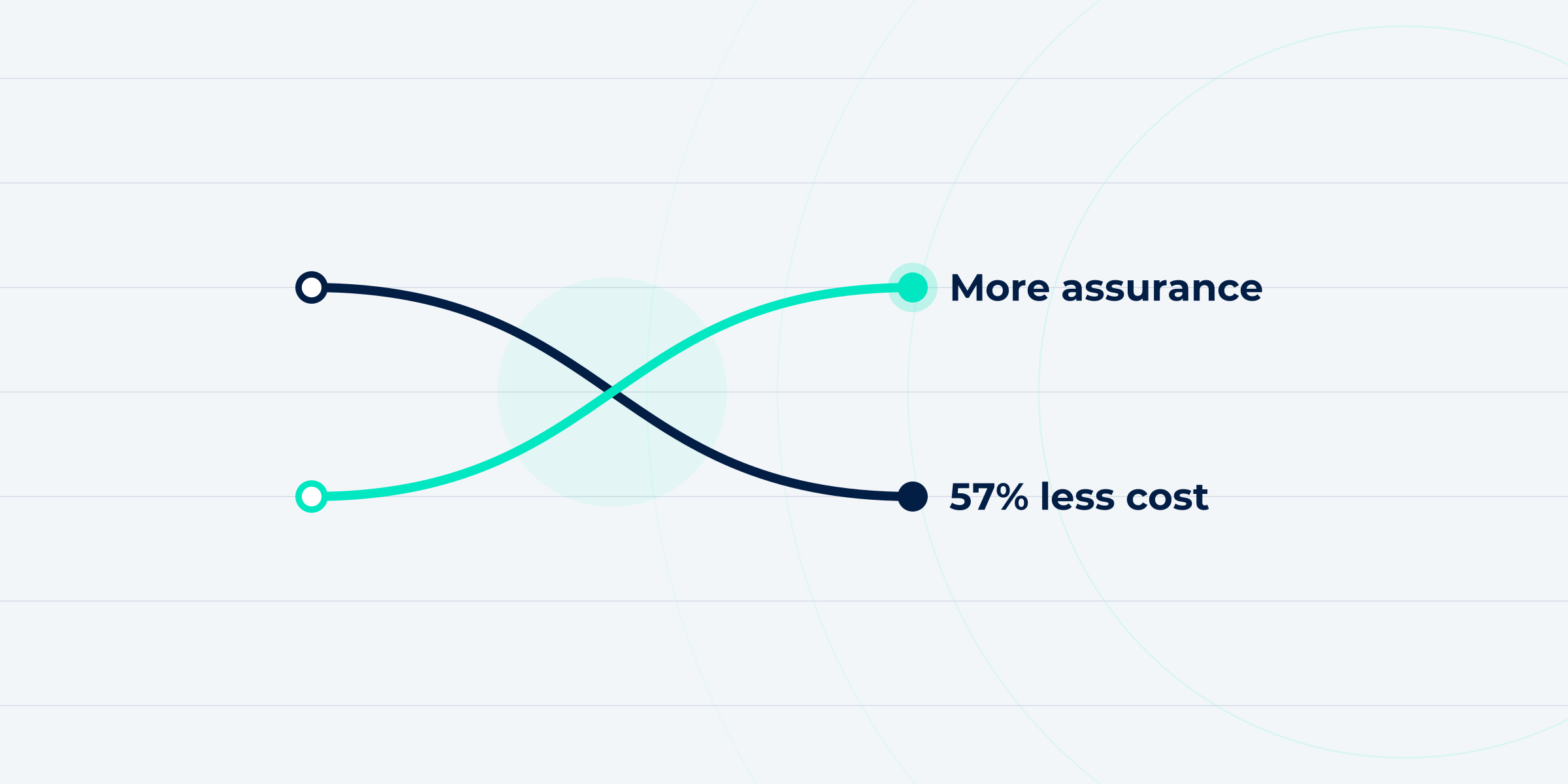
More assurance at less cost: the business case for control framework optimisation and control automation
Our COO Maurits Toet's business case: how optimising and automating your control framework can cut the cost of control by more than half, while assurance goes up.

CERRIX & Ruler User Conference 2026
On 16 September, CERRIX and Ruler users met at VvAA in Utrecht to compare notes on risk management. Here's what stood out to us.
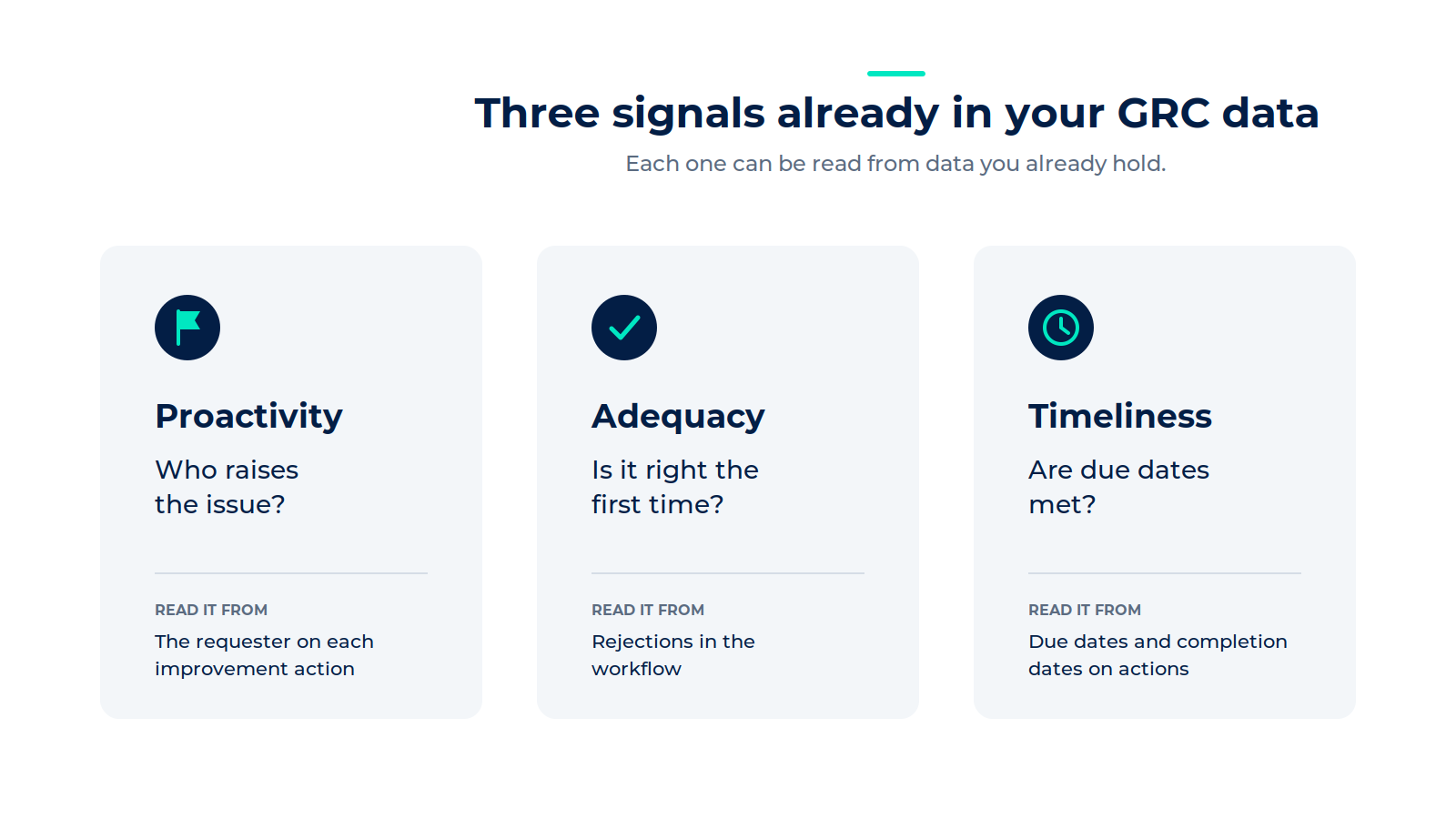
Three signals in your GRC data that show how your organisation handles risk
Takeaways from the CERRIX webinar with Jeroen Tacke and Ruben Andeweg: three signals in your GRC data that show how your organisation handles risk.
.png)
CERRIX vs Diligent: GRC software compared across features, European market fit and compliance
A side-by-side look at two GRC platforms, and which one fits the DORA, NIS2, and ISQM obligations European teams carry.
.png)
Conversational GRC: work with your risk data from the AI agent you already use
Query your controls, update tasks, and generate board-ready reports, all from Claude, Microsoft Copilot or another AI agent.
.jpg)
CERRIX vs ServiceNow: GRC software compared across features, pricing, and compliance
CERRIX vs ServiceNow: GRC Software compared across features, pricing, and compliance (2026)
.jpg)
AI in GRC: beyond the hype. What actually works at every level of adoption
Key takeaways from the CERRIX panel on AI in GRC, with practitioners from CERRIX, AuditAgent and 8weeks.co sharing what actually works.
.avif)
Top European GRC tools in 2026: An insider's comparison
This blog compares the top GRC platforms available to European organizations in 2026

What Does GRC Look Like in 2030?
By 2030, AI in GRC will automate evidence collection, control monitoring, and routine reporting across all three lines of defense, shifting risk managers from administrative work to strategic advisory roles

The Complete GRC Chain: Connecting Regulatory Change Management, Risk, and Controls in One Platform
The future of Governance, Risk & Compliance (GRC) lies in connecting regulatory change management directly to risks, controls, incidents, actions, and assurance activities in one integrated platform.

Embedding automation into your risk operating model: Where AI fits and how to make It work
This second part focuses on what makes that automated model intelligent. Where AI fits. What it means for risk professionals in practice.

From checkbox to continuous: How to embed automation into your risk operating model
What it means to truly embed automation into the risk operating model: what changes, what stays the same, and what it takes to make it work in practice.
.jpg)
Why CERRIX acquired Ruler, and what it means for the future of GRC
CERRIX acquires Ruler to connect regulatory change with risk management.
%20(1).png)
Why Data Quality Is the Foundation of AI and Automation in GRC
A strategic look at why structured data in a GRC tool is imperative for automation, AI enabled workflows, and real time risk insights.
.jpg)
Internal Control Framework Challenges: Why COSO and ISO 31000 Implementations Struggle in Practice
Why do internal control framework implementations (COSO, ISO 31000) struggle? Explore common challenges in process design, ownership, tooling, and governance
%20(3).jpg)
Control Assurance Explained: How Organizations Move from Control Testing to Continuous Monitoring
Discover how modern control assurance moves beyond periodic testing to continuous monitoring, with clear ownership, automation, and expert opinion.

Incident Management under DORA: What Risk and Compliance Leaders Need to Rethink
Incident Management under DORA: What Risk and Compliance Leaders Need to Rethink
.jpg)
How to Apply ISO 31000 Risk Treatment in Practice: Insights for Risk and Compliance Leaders
A practical recap of CERRIX ISO 31000 risk treatment webinar
%20(1).jpg)
How We Use CERRIX GRC to Manage Our ISMS: ISO 27001 in Practice
We use our own CERRIX GRC software to manage CERRIX’s ISMS, turning compliance into confidence and showing how ISO 27001 can become part of daily business practice.
.jpg)
Why the Three Lines of Defense Model Is Outdated? What Every Board Should Know About the Three Lines Model
Three Lines Model Explained: Why Boards Must Move Beyond 3LOD
.jpg)
What Is ISO 31000 and How Does It Work?
Discover what ISO 31000 is, how it works, and why it’s essential for risk management in 2025. Learn the principles, framework, and how tools like CERRIX help organizations turn ISO 31000 into practice.
.jpg)
How to Write an Incident Report That Stands Up to Audits
Learn how to write incident reports that are clear, evidence-backed, and audit-ready. Includes a template, best practices, and compliance alignment for risk professionals.
.jpg)
How to Implement ISO 31000: Real-Time Risk Decisions with AI‑Enabled Tools
Discover how to move beyond compliance and operationalize ISO 31000 using AI, real-time dashboards, and structured risk assessments. Learn from webinar insights and best practices tailored for financial services and regulated industries.
%20(1).jpg)
What’s Blocking Your ISMS Rollout? 7 Fixable Challenges for Financial Institutions
Discover the 7 biggest blockers in ISMS rollout for financial institutions—and how to solve them. Learn practical strategies to secure buy-in, define scope, streamline controls, and prepare for ISO 27001 certification.
.jpg)
Trends Driving ISMS Adoption in 2025: What Risk & Compliance Leaders Need to Know
Discover the top trends pushing organizations toward ISMS adoption in 2025—from regulatory changes and remote work to threat evolution and AI. Learn what to prioritize to stay ahead in risk and compliance.
%20(1).jpg)
What Is an ISMS? A Practical Guide for Risk & Compliance Leaders in 2025
An Information Security Management System (ISMS) is more than policy—it’s your organization’s shield against evolving threats, regulation, and reputation risk. Discover what ISMS means, how to implement it, and why it matters in 2025.
.jpg)
The Intelligent Future of GRC: How AI is Reshaping Governance, Risk & Compliance in 2025
Explore how AI is transforming GRC in 2025—from predictive insights and automation to ethical oversight. Learn what features matter, what risks to manage.
.jpg)
How Do You Implement an ISMS in Financial Services Without Slowing Down Innovation?
Implementing an ISMS in financial services? Explore a practical, risk-aligned roadmap tailored for banks, fintechs, and insurers to meet ISO 27001, GDPR, and DORA compliance—without compromising agility.

How Do You Build a Robust ISMS Framework Based on ISO 27001?
Learn how to build a robust ISMS framework aligned with ISO 27001. Discover the key components—people, policies, processes, and controls—to strengthen security and achieve compliance.
.jpg)
When to Conduct Risk Assessments: 6 Enterprise-Critical Moments
Learn when to conduct risk assessments—annual, quarterly, after incidents or change—and how CERRIX ensures continuous compliance.
.jpg)
How do you build a system of quality management that works under ISQM 1?
Learn how to build a system of quality management under ISQM 1. Move beyond compliance to an operational model that proves audit quality.

What Are Risk Scoring Methods for Financial Institutions? [2025 Guide]

From Risk Assessment to Risk Management: Moving Beyond Checklists in 2025
Understand the evolution from risk assessment to strategic risk management in 2025. Learn why leading organizations are embedding risk into decision-making—and how GRC platforms like CERRIX support this shift.
What is risk management? A strategic guide for leaders in 2025

How Audit Firms Embed ISQM into Daily Practice
In our second ISQM webinar, experts from RSM, Grant Thornton, and CERRIX shared practical insights on how audit firms can embed ISQM into the heart of their operations.
.jpg)
What is the maximum fine for GDPR violations?
Discover the maximum fine for GDPR violations: €20 million or 4% of global turnover. Learn the two-tier penalty system, notable examples, and how to prevent costly data protection breaches.

How do you conduct a GDPR compliance assessment?
Learn how to conduct a GDPR compliance assessment with our step-by-step guide covering data mapping, documentation requirements, and 6 common gaps organizations discover. Reduce risks and ensure compliance.
What are the main requirements of GDPR?
Discover the 7 essential GDPR requirements every organization must follow. Learn about data protection principles, individual rights, breach handling, and practical compliance strategies in this comprehensive guide.
%20(2).jpg)
How often should you review third party risks?
Discover how often to review third party risks with our tiered approach: quarterly for high-risk vendors, semi-annually for medium, and annually for low-risk partnerships.

What should be included in a vendor due diligence process?
Discover what a comprehensive vendor due diligence process should include: financial stability assessment, security controls, compliance verification, risk evaluation criteria, and ongoing monitoring frameworks.

How do you assess vendor risk?
Learn how to implement vendor risk assessment in 5 clear steps. Discover essential strategies to protect your organization from third-party threats and ensure regulatory compliance.

What are the main types of supplier risks?
Discover the 5 critical types of supplier risks that threaten your business continuity. Learn effective strategies to identify, assess, and mitigate these vulnerabilities before they impact your operations.

What is a compliance risk assessment?
Discover how to conduct an effective compliance risk assessment to identify regulatory risks, prevent violations, and transform compliance challenges into strategic business advantages.
How do you report compliance violations?
Learn how to report compliance violations effectively through proper channels while protecting your identity. Discover documentation requirements, whistleblower protections, and what happens after you submit a report.

How do you calculate risk probability and impact?
Learn how to calculate risk probability and impact using proven methods. Transform uncertainty into measurable risks for better decision-making and strategic resource allocation.

What is third party risk management?
Learn what third party risk management is, how it protects your organization from external threats, and the steps to implement an effective TPRM program to ensure compliance and security.

What are the benefits of risk management for businesses?
Discover how risk management benefits businesses by protecting financial health, improving decision-making, ensuring compliance, and creating competitive advantages that transform threats into opportunities.

What is a risk register and how do you create one?
Wondering what a risk register is? Learn how to create this essential tool to identify, assess, and manage organizational risks effectively and boost compliance.

How often do ISO certifications need to be renewed?
Wondering about ISO certification renewal? Understand the three-year cycle, annual surveillance audits, and preparation strategies to maintain compliance seamlessly.

What documents are required for ISO 27001 implementation?
Discover the mandatory and recommended documents required for successful ISO 27001 implementation. Learn how to organize, create and maintain effective ISMS documentation that satisfies auditors and enhances security.

Do I need a consultant for ISO certification?
Wondering if you need a consultant for ISO certification? Discover key factors to make the right decision for your organization based on expertise, resources, and certification complexity.

What industries benefit most from ISO certification?
Discover which industries gain the most value from ISO certification. Financial services, technology, healthcare, and manufacturing organizations see superior ROI while enhancing compliance and competitive advantage.

Can a company lose its ISO certification?
Can a company lose its ISO certification? Discover the 8 common reasons, consequences, and prevention strategies to protect your business reputation and investment.

How long does it take to get ISO 9001 certified?
Discover how long ISO 9001 certification takes, from 4-12 months depending on your organization's size and complexity. Learn the key phases, challenges, and ways to accelerate your quality management journey.

What is ISO 27001 and why is it important for businesses?
Discover how ISO 27001 certification protects your business data, builds customer trust, and ensures regulatory compliance in today's high-risk digital landscape. A complete implementation guide.
What to know about GRC software for nis2
Explore how GRC software helps businesses comply with the NIS2 Directive, enhancing cybersecurity and risk management.
Can automation reduce compliance costs?
Explore how automation can reduce compliance costs, enhancing efficiency and ensuring regulatory adherence.
What industries benefit from compliance automation?
Discover which 6 industries benefit most from compliance automation and how it transforms regulatory burdens into strategic advantages through risk reduction and operational efficiency.
How automation streamlines compliance processes
Discover how compliance process automation reduces costs by 40-60% while minimizing errors and risks. Transform manual workflows into strategic advantages for your organization.
Is cybersecurity compliance automation secure?
Discover if cybersecurity compliance automation strengthens or risks your security posture. Learn implementation best practices that enhance protection while simplifying regulatory management.
Does automation reduce compliance risks?
Explore how automation impacts compliance risks, its benefits, limitations, and integration strategies.
Key sectors affected by NIS2 compliance
Explore the impact of NIS2 compliance on key sectors like energy and healthcare, enhancing cybersecurity and data protection.

Are automated compliance tools reliable?
Exploring the reliability of automated compliance tools and their role in cybersecurity.
%20(1)%20(2).jpg)
DORA compliance checklist for beginners
An essential guide for beginners to understand and implement DORA compliance effectively.

Key benefits of adhering to DORA compliance
Explore the key benefits of DORA compliance, enhancing security, efficiency, and regulatory adherence.

NIS2 compliance: top strategies for success
Explore effective strategies for NIS2 compliance to enhance cybersecurity and regulatory adherence.

EU AI Act vs. GDPR: what's the difference?
Explore the key differences and overlaps between the EU AI Act and GDPR, focusing on regulation, impact, and compliance.

Can GRC tools predict compliance risks?
Exploring if GRC tools can predict compliance risks and their role in risk management.

Can a GRC tool adapt to regulatory changes?
Explore if GRC tools can adapt to regulatory changes, covering compliance management and risk assessment.
How does AI governance impact compliance?
Explore the impact of AI governance on compliance, focusing on regulation, ethics, and risk management.
.jpg)
How to prepare for the EU AI Act implementation?
Learn how to prepare for the EU AI Act implementation with practical steps for compliance.

Is your business ready for the EU AI Act?
Explore readiness for the EU AI Act with insights on compliance, challenges, and strategic planning for businesses.
.png)
How does DORA compliance impact financial sectors?
Discover how DORA compliance strengthens financial sectors, enhancing risk management, digital resilience, and regulatory standards.
.jpg)
What is DORA compliance and why does it matter?
Explore DORA compliance, its significance in financial services, and strategies for effective implementation.
DORA compliance vs other regulatory standards
Explore the differences between DORA compliance and other regulatory standards, focusing on financial regulations and cybersecurity.

Can automation improve DORA compliance efforts?
Explore how automation can enhance DORA compliance efforts by streamlining processes and ensuring ongoing monitoring.

How to integrate GRC with existing systems?
Integrating GRC with existing systems enhances compliance, risk management, and efficiency.
Can settlement discipline improve market stability?
Exploring how settlement discipline can enhance market stability, focusing on its benefits and challenges.

Why real-time analytics in GRC are vital
Real-time analytics in GRC is crucial for proactive risk management and continuous compliance monitoring.

Top 10 Features Every GRC Tool Should Have in 2025
Explore essential GRC tool features like integration, risk management, compliance, governance, and customization.

How to prepare your business for CSDR compliance?
Guide to preparing your business for CSDR compliance, covering key strategies, challenges, and technology solutions.

Embedding ISQM 1 into the DNA of Your Audit Firm: A Risk-Based Approach to Quality Management
Discover how to implement ISQM 1 with a risk-based approach. Learn how audit firms can embed quality management into daily operations and governance.
%20(1).avif)
CERRIX User Conference 2025
On March 12, 2025, industry leaders, assurance experts, and CERRIX customers came together for the CERRIX User Conference 2025—a day of knowledge-sharing, insightful discussions, and collaboration on the future of risk management, compliance, and AI-driven GRC solutions.

From Spreadsheets to GRC Software: Why Pension Funds Need a Modern Approach to Risk Management

CERRIX and BR1GHT Strengthen Long-term Partnership to Enhance Governance, Risk, Compliance and Audit Solutions

Implementing DORA: From Compliance to Long-Term Resilience
